

You arrive at the office tomorrow morning only to find a notice from the city:
Entrance not permitted.
A foundation issue. A ruptured utility line. Something unexpected — and completely out of your control.

Someone physically stops you from entering.

What happens next?

Do you pivot immediately and keep operating, or does the day grind to a halt?
What if the disruption lasts a week? What if it’s longer?
Who decides the next step, and how quickly?

For some organizations, this scenario is an inconvenience. For others, it’s a full stop.

If your team can work securely from anywhere, access systems remotely, and continue serving customers without missing a beat,
that’s a sign of preparation. If not, the absence of a clear plan can quickly turn a temporary disruption into a material business risk.

This is exactly where Business Continuity Planning (BCP) proves its value.
BCP doesn’t have to be overly complex or theoretical. At its core, it’s about knowing — before something goes wrong
what your next move is. Sometimes that’s a simple, one-page plan. Other times, it’s a structured decision framework that accounts
for multiple failure scenarios.

Either way, being prepared makes the difference between reacting under pressure and operating with confidence.


How We Help Organizations Prepare for the Unexpected

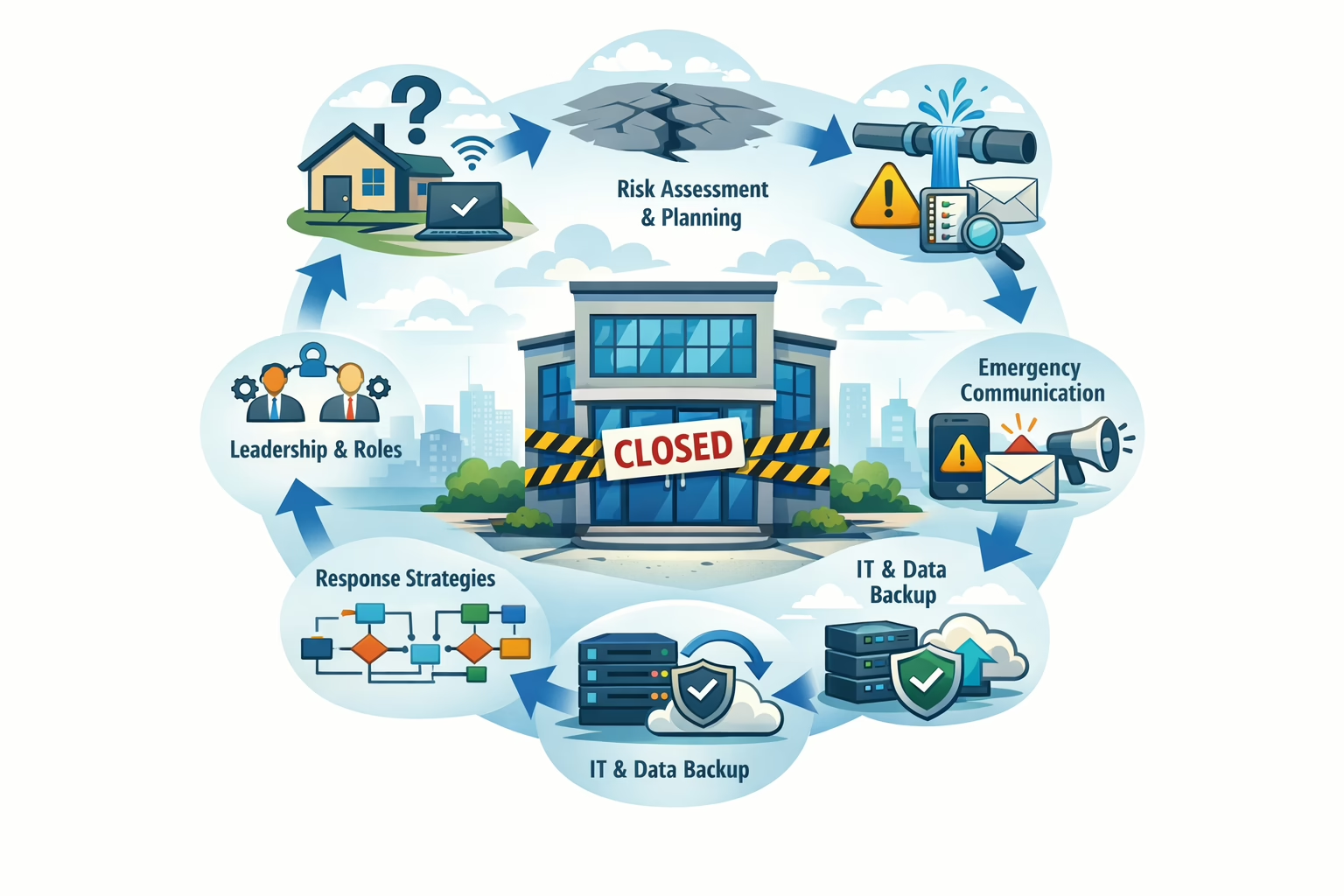
Business Continuity Cycle

  • Right-sized BCP development
    From lightweight, executive-ready continuity plans to comprehensive, multi-path decision models.
  • Technology-enabled continuity
    Assessing systems, access, and dependencies to ensure teams can operate securely from anywhere.
  • Scenario planning & risk analysis
    Identifying realistic disruption scenarios — not just worst cases — and defining clear response actions.
  • Clear ownership & decision frameworks
    Ensuring everyone knows who decides what and when during a disruption.
  • Practical, usable documentation
    Plans designed to be followed in real situations, not left on a shelf.

If you’re unsure what happens the next time your doors are closed — even temporarily — it may be time to put a business continuity plan in place.
Preparation today can protect tomorrow’s operations. Reach out for a consultation today.

Selling your business?

Preparing Your Business for Exit: How Smart Technology Increases Value Without Changing What Makes You Successful

For established business owners, the decision to transition toward retirement often starts with a simple question:
“How do I make this business attractive to the next owner—without breaking what already works?”

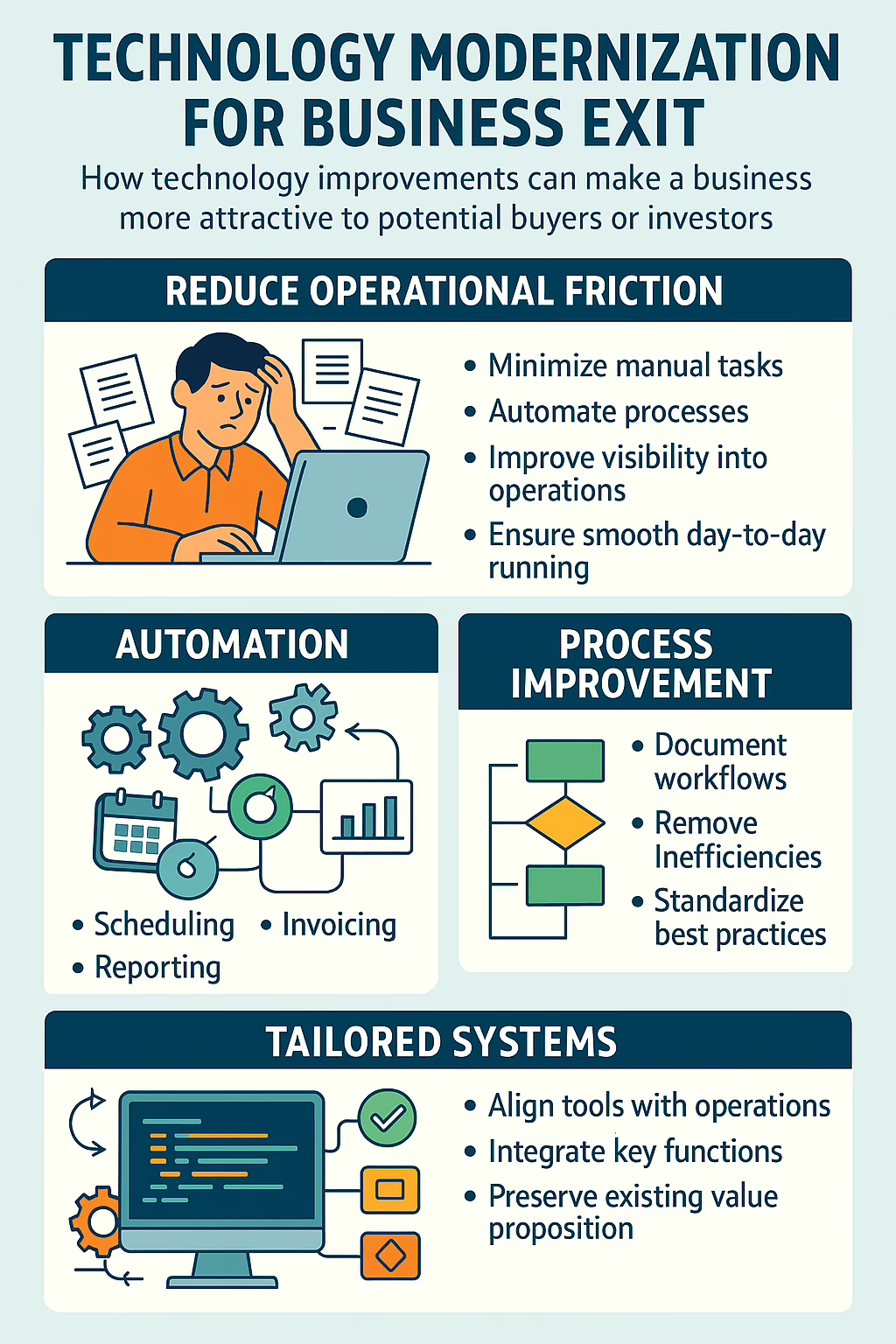
Technology Modernization  for Business Exit Summary Infographic

The answer increasingly lies in technology—but not in the way most founders fear.

This isn’t about ripping out familiar processes, forcing teams into generic tools, or chasing the latest software trends.
It’s about strategically modernizing the operational backbone so your business runs more efficiently,
more predictably, and with less owner dependency—while preserving the value proposition that made it successful.

Why Technology Matters in a Business Sale

Buyers and investors don’t just evaluate revenue and margins. They look closely at:

  • How dependent the business is on the current owner
  • How repeatable and documented core processes are
  • Whether operations can scale without adding headcount
  • How much “busy work” exists behind the scenes
  • The quality, reliability, and integration of internal systems

When a business relies heavily on manual work, spreadsheets, tribal knowledge, or the owner’s daily involvement, it introduces risk.
Risk lowers valuation.

Modern, well-designed systems do the opposite: they signal maturity, stability, and future upside.

The Real Goal: Reduce Operational Friction, Not Reinvent the Business

One of the biggest mistakes owners make when preparing for an exit is assuming technology means change—for customers, staff, or core workflows.

In reality, the most valuable improvements are often invisible externally.

The goal is to:

  • Minimize repetitive, manual tasks
  • Automate handoffs between departments
  • Improve visibility into operations and performance
  • Ensure the business can run smoothly without constant oversight

All without compromising how the product or service is delivered today.

Your customers shouldn’t notice a difference.
Your team should feel relief—not disruption.
And a future owner should see a business that “just works.”

Automations That Buyers Love (and Owners Appreciate)

Strategic automation removes low-value work from daily operations, freeing time and reducing errors. Common high-impact areas include:

  • Order or job intake workflows
  • Scheduling and resource allocation
  • Invoicing, billing, and payment processing
  • Reporting and performance tracking
  • Customer communications and status updates

The result is a business that feels calmer, more predictable, and less dependent on heroics—something both owners and buyers value highly.

Process Improvement That Preserves Institutional Knowledge

Over time, many businesses evolve processes organically. What started as a simple workaround becomes “the way we do things,”
even if no one can fully explain why.

Before an exit, this creates risk.

Modernizing for sale often includes:

  • Mapping critical processes end-to-end
  • Removing unnecessary steps and handoffs
  • Embedding best practices directly into systems
  • Making workflows repeatable and documented

When processes live inside the system—not just in people’s heads—the business becomes far easier to transition.

Using the Right Systems—Not More Systems

Buyers are wary of tool sprawl: disconnected platforms, manual integrations, and systems that only one person understands.

Technology modernization for exit focuses on:

  • Choosing systems that align with how the business actually operates
  • Integrating tools so data flows automatically
  • Eliminating redundant software and shadow processes
  • Creating a clear, understandable technology landscape

Simplicity and clarity matter more than feature lists.

A Different Approach: Technology That Fits Your Business

One of the biggest frustrations owners face is being told to “change how you work” to fit a piece of software.

We take the opposite approach.

We build software and systems around the client’s real-world processes.
Not generic workflows. Not off-the-shelf assumptions.
But technology that reflects how value is actually delivered today.

This means:

  • Preserving what already differentiates the business
  • Supporting existing strengths instead of flattening them
  • Making operations easier without losing identity

For buyers, this translates into confidence.
For owners, it means improvement without disruption.

The Exit You’re Really Preparing For

Whether you plan to sell in two years or five, the work you do now has immediate benefits:

  • Less day-to-day busy work
  • More time out of the weeds
  • Better visibility into performance
  • A business that runs smoothly without constant involvement

And when the time comes to transition, you’re not selling potential—you’re selling a
well-engineered operation built for continuity and growth.

Thinking about retirement or a future exit?

Modernizing your technology doesn’t have to mean changing your business. When done correctly, it makes what you’ve already built
easier to run, easier to understand, and far more attractive to the next owner.
Should You Let AI Automate Everything?

Should You Let AI Automate Everything?

AI tools are astonishingly capable. They can summarize documents, draft emails, classify data, and even hold basic conversations. It’s natural to ask: “If AI is this powerful, shouldn’t we just use it to automate everything?”

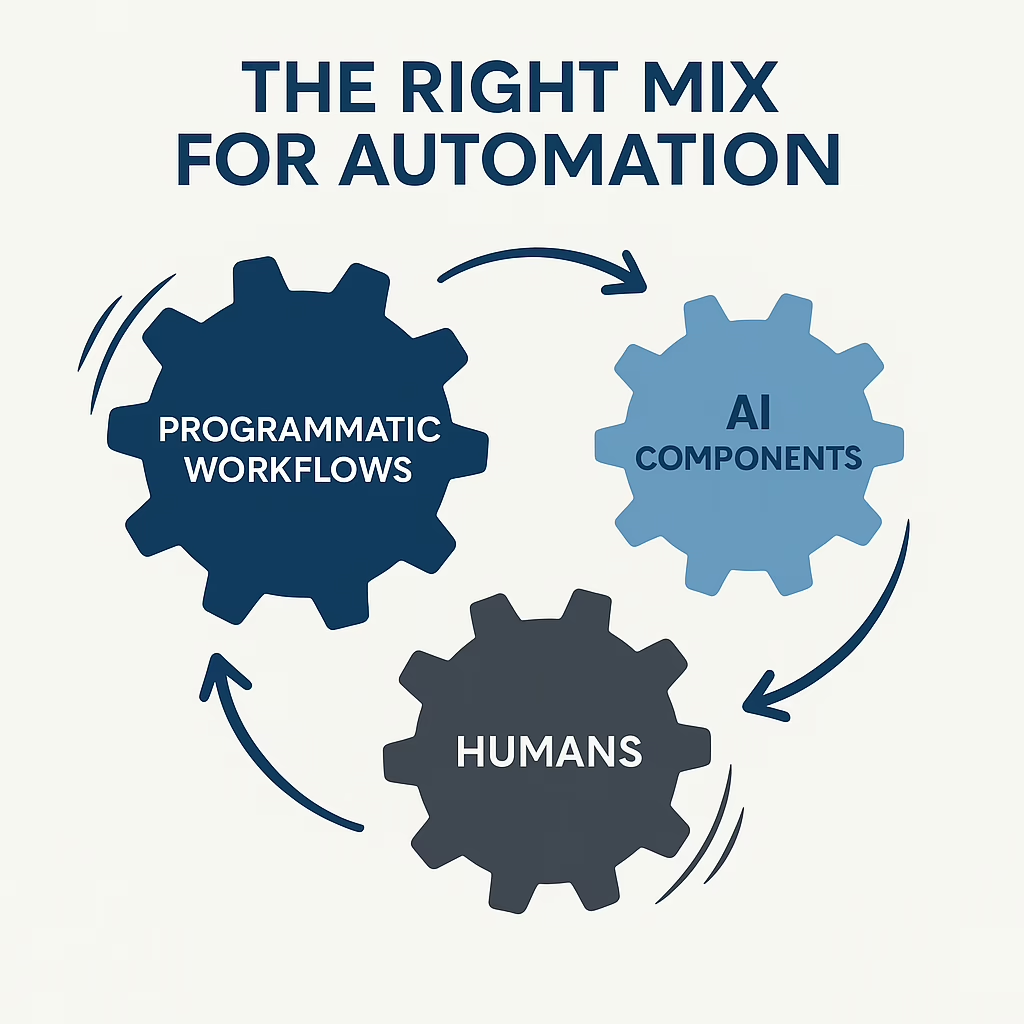
Programmatic Workflows, AI Components and Humans working together

In practice, the answer is no.
Relying on AI for every automation is a fast way to create fragile systems, inconsistent results, and frustrated teams.
The most reliable, efficient automation strategies use a blend of:
programmatic workflows, AI-driven steps, and human judgment.

AI Is Powerful – But It’s Not Your Whole Automation Strategy

AI is probabilistic, not deterministic. It predicts what is likely to be correct; it does not follow strict rules the way traditional software does. That means it’s fantastic for pattern recognition and language tasks, but risky when you need exact rules, precise calculations, or guaranteed outcomes.

When teams try to “let AI handle it all,” they often run into issues such as:

  • Integration friction: Difficulty connecting AI tools securely to CRMs, ERPs, accounting systems, and other data sources.
  • Workflow gaps: Low-code tools (e.g., Zapier-style systems) that don’t map cleanly to how the business actually operates.
  • Approximate answers where exactness is required: AI outputs that are “close enough” but still wrong in ways that matter (totals, dates, names, etc.).
  • Inconsistent behavior over time: The same prompt producing different results, making it hard to trust or troubleshoot.
  • Limited auditability: Difficulty answering, “Why did it do that?” when something goes wrong.

The key is recognizing where AI adds unique value and where traditional programmatic automation or humans should remain in control.

The Right Mix: Programmatic Workflows, AI, and Humans

We encourage clients to think of automation as a layered system:

  • Programmatic workflows: The backbone. Deterministic, rules-based logic that is predictable and testable.
  • AI components: Specialized “assistants” that handle judgment calls, language, and unstructured data.
  • Humans: Final authority on exceptions, high-risk decisions, and relationship-driven interactions.

When these three layers are designed together, you get systems that are both powerful and trustworthy.

When to Use Programmatic Workflows

Programmatic (rules-based) workflows are ideal when you need repeatable, predictable behavior. Use them when:

  • Steps are well defined: The process follows a clear, repeatable sequence (e.g., “if X, then do Y”).
  • No judgment calls are needed: The right answer can be written as a rule, not a “gut feeling.”
  • Systems expose APIs or import/export options: CRMs, accounting systems, databases, and other tools can be reliably integrated.
  • Tasks are high importance or high risk: Compliance processes, financial postings, critical notifications, and system-of-record changes.
  • You need audit trails: Being able to see exactly what happened, when, and why.

Example: Syncing customer data between your CRM and billing system, validating invoice totals, or enforcing approval rules before an order is released. These are best handled with traditional automation, not AI prompts.

When to Use AI Workflows

AI shines where structure breaks down and judgment is needed at scale. Use AI when:

  • Programmatic logic hits a wall: The task cannot be expressed as simple rules without becoming overly complex.
  • Minor judgment calls are acceptable on low to medium importance tasks: Classifying support requests, suggesting responses, summarizing conversations.
  • Interfacing with unknown people or systems: Parsing inbound emails from prospects, reading attachments, or interacting with other AI systems.
  • Processing large volumes of unstructured data: Emails, PDFs, free-form notes, and documents that would be expensive to handle manually.

Example: AI can read a long client email, classify its urgency and topic, draft a suggested response, and route it into the correct queue.
Programmatic logic then takes over to enforce SLAs, track status, and ensure follow-through.

When to Keep Humans in the Loop

Even with strong AI and automation, humans remain critical to a robust system. Use human steps when:

  • Both AI and programmatic workflows have demonstrated failure: Repeated edge cases, complex exceptions, or high-stakes decisions.
  • Specific approvals are required: Signing off on discounts, contract terms, compliance-sensitive steps, or unusual financial entries.
  • Client experience depends on human touch: Difficult conversations, strategic planning, and relationship-driven sales or service.
  • Prototyping new workflows: Let humans run the process manually first so you can validate the steps before codifying them with automation and AI.

The goal isn’t to remove humans entirely, but to reserve their time for the highest-value decisions and interactions.

Common Pitfalls When Teams Go “AI-First”

When organizations try to automate “with AI everywhere,” we often see patterns like:

  • Over-automation of unclear processes: Automating a broken workflow just lets you make mistakes faster.
  • No clear boundaries: AI is allowed to change critical data or trigger actions without guardrails.
  • Lack of monitoring and review: Nobody is regularly checking whether the AI is still performing as intended.
  • Underinvestment in basic plumbing: APIs, structured data, and well-designed workflows are ignored because “the AI will figure it out.”

The result is often more chaos, not less. The better approach is to:
use AI thoughtfully inside a well-designed automation architecture.

How Open InfoTech Solutions Helps

At Open InfoTech Solutions, we help companies design automation strategies that balance programmatic workflows, AI, and human oversight so you get:

  • Reliability: Core processes that run the same way every time, with clear logs and audit trails.
  • Intelligence where it counts: AI placed at specific points in the process to handle language, classification, and unstructured data.
  • Human control for critical decisions: Well-defined checkpoints where people review and approve exceptions or high-impact actions.
  • Better visibility: Dashboards and reporting to see what’s automated, what AI is doing, and where humans are required.

We don’t just plug in tools. We work with you to:

  • Map your existing workflows and identify automation opportunities.
  • Decide which steps should be rules-based, AI-driven, or human-driven.
  • Implement and integrate the right tools (including AI) into your systems securely.
  • Set up monitoring, exception handling, and continuous improvement routines.

Ready to Build Smarter Automations?

If you’ve tried to “let AI automate everything” and ended up with unreliable workflows or confusing results, you’re not alone. A better path is available.

Open InfoTech Solutions can help you design automations that are stable, scalable, and intelligent – without handing the keys to AI alone. If you’d like to review a specific workflow or explore where AI fits into your automation roadmap, please reach out to our team and let’s start the conversation. Contact Us

TOP