

Platform Consolidation in 2026: How Enterprises Are Replacing Tool Sprawl with Integrated Digital Ecosystems
SaaS sprawl has quietly become a growth limiter. In 2026, more organizations are shifting from “more tools” to
fewer, better-integrated platforms—reducing operational friction, strengthening data foundations,
and accelerating delivery.
Over the last decade, enterprises adopted specialized tools to move faster: ticketing here, analytics there,
workflow automation somewhere else. The result? Many organizations now run dozens—sometimes hundreds—of SaaS
products across departments. What started as agility often turns into a web of disconnected systems:
duplicated capabilities, fragile integrations, inconsistent data, and rising costs.
architecture and operating-model shift toward integrated digital ecosystems that scale.
The Real Cost of Tool Sprawl
Tool sprawl creates hidden taxes across the organization—taxes that don’t show up as a single line item,
but compound over time:
- Custom API connections that break with vendor updates
- Middleware that becomes a product of its own
- More systems to secure, monitor, and support
- Teams re-entering the same data in multiple places
- Inconsistent workflows and duplicated effort
- Slower onboarding and more training burden
- Multiple “sources of truth” depending on who you ask
- Inconsistent metrics across finance, ops, and product
- AI initiatives slowed by siloed and ungoverned data
- Overlapping subscriptions with redundant features
- Unused seats and underutilized modules
- Rising spend without measurable outcomes
Why 2026 Is the Tipping Point
The push toward consolidation is happening now because multiple forces are converging:
- Budget scrutiny is higher: leadership teams want spend tied to outcomes, not tool counts.
- Integration complexity is compounding: every new tool adds new dependencies and risk.
- Data has become strategic: fragmented data undermines analytics, automation, and AI.
- Security expectations have increased: more tools mean a larger attack surface and more governance overhead.
The problem isn’t that enterprises adopted too many tools. It’s that most didn’t adopt a platform strategy to
make those tools work as a coherent system.
What Platform Consolidation Really Means (And What It Doesn’t)
What it is
- A strategic architecture shift toward fewer core platforms with strong integration patterns
- API-first and composable design so capabilities can evolve without rewrites
- A unified data foundation to improve decision-making and enable AI-ready workflows
- Standardized operating models for delivery, governance, and change management
What it is not
- A one-time cost-cutting initiative
- A forced “rip and replace” program
- A single-vendor lock-in decision by default
- An IT-only project without business alignment
The Business Case: Efficiency, Agility, and Scalable Growth
When consolidation is approached as platform strategy—not tool elimination—organizations typically aim for
three outcomes:
1) Operational Efficiency
Reduce integration overhead, standardize workflows, and lower ongoing maintenance so teams can focus on
delivery instead of duct tape.
2) Better Decisions
Build a consistent data model across functions, improving reporting quality and enabling real-time
visibility into performance.
3) Faster Innovation
Create reusable platform capabilities—identity, data access, workflows, APIs—so new products and features
ship faster with less risk.
Architecture Patterns That Make Consolidation Work
Consolidation succeeds when the underlying architecture supports evolution. These patterns show up repeatedly
in high-performing enterprises:
API-First Platform Engineering
Treat integration as a first-class product. Define stable APIs, enforce versioning, and build shared
platform services that teams can use consistently.
Event-Driven Integration (Where It Fits)
For real-time operational workflows, event streams can reduce point-to-point coupling and keep systems in
sync without brittle orchestration.
Unified Data Layers
Establish a governed data foundation (e.g., domain-oriented data products or a shared semantic layer) so
analytics, automation, and AI rely on consistent truth.
Cloud-Native Foundations with Governance
Modern infrastructure patterns (observability, identity, policy-as-code) help platforms scale while keeping
risk under control.
Common Pitfalls That Derail Consolidation
Consolidation efforts fail more often from program design than from technology choices. Watch for these traps:
- Procurement-led consolidation without architecture ownership (tools removed, complexity remains)
- Underestimating change management (teams work around the platform instead of adopting it)
- Ignoring data migration and data quality (new system, same broken reporting)
- No phased roadmap (too big-bang, too risky, too slow)
- Misaligned incentives (departments optimize locally instead of for enterprise outcomes)
architecture, delivery practices, data governance, and operating-model change.
A Practical Framework for Platform Rationalization
A reliable approach is to treat consolidation as a multi-phase modernization program:
- Capability Mapping: Identify the business capabilities each tool supports (not just departments).
- Redundancy Assessment: Find overlaps, underused platforms, and critical dependencies.
- Data Flow Audit: Map where truth lives, where data breaks, and what needs governance.
- Architecture Blueprint: Define the target ecosystem—core platforms, integration patterns, and shared services.
- Phased Roadmap: Sequence migrations by business impact and risk, delivering value every quarter.
Where Engineering Teams Create Leverage
Platform consolidation lives at the intersection of strategy and execution. The organizations that move fastest
typically invest in:
Strategy & Architecture
- Target platform blueprinting and integration strategy
- Security and governance baked into platform decisions
- Roadmapping tied to measurable business outcomes
Delivery & Enablement
- Migration factories and repeatable modernization patterns
- Platform engineering capabilities (APIs, identity, observability)
- Operating-model changes that drive adoption (not workarounds)
Conclusion: From Tool Ownership to Platform Advantage
In 2026, platform consolidation is less about reducing the number of tools and more about building an ecosystem
that behaves like a coherent product. The winners will be the organizations that design platforms around business
capabilities, unify data foundations, and standardize integration patterns.
The payoff is practical and compounding: less operational friction, stronger governance,
and faster delivery as the enterprise scales.
Call to Action
If your teams are spending more time stitching tools together than delivering new capabilities, it may be time
to evaluate your platform strategy.
Start a Platform Rationalization Assessment
Replace the button link with your WordPress page or contact form URL.
FAQ: Platform Consolidation
standardizing integration patterns, and unifying data foundations—so the enterprise operates as a coherent
digital ecosystem.
reduce redundancy, and modernize integration and data foundations without forcing a risky big-bang change.
fragmented, and which platforms should become the foundation for modernization.
- Published in Technology
Why Custom MCP Servers Are Becoming a Core Part of Modern AI Architecture
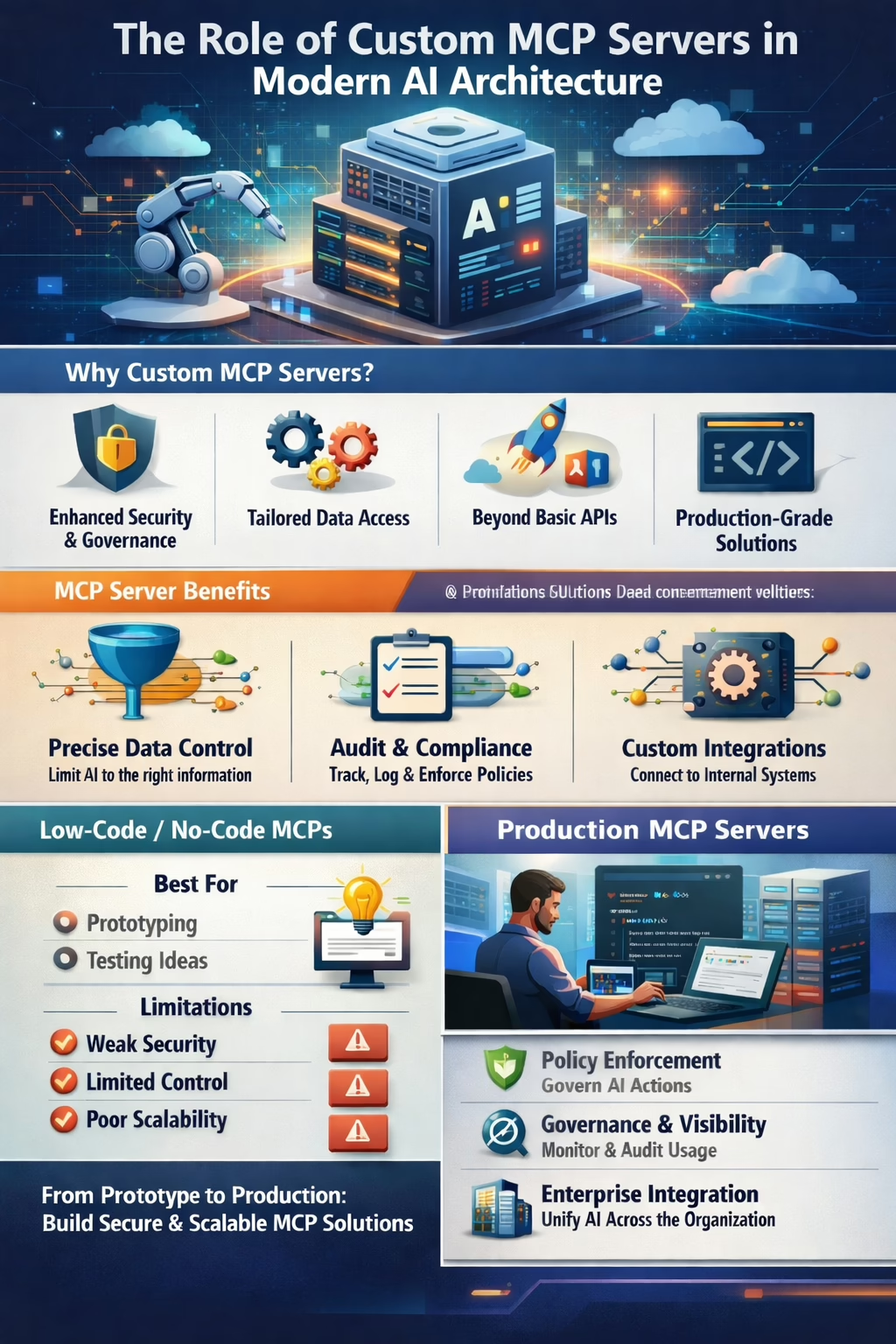
As AI systems move from experimentation into real production workflows, organizations need a secure, governed way to connect models to company systems and data. That’s where MCP servers are quickly becoming essential.
Summary
-
1MCP servers provide connectivity and control for how AI systems use and interact with your company data.
-
2A custom-built MCP server improves security, governance, and reliability by enforcing your policies at the point of AI access.
-
3Low-code / no-code MCPs are best for prototyping—they can fall short for scalability, security, and mission-critical workloads.
-
4Serious AI adoption requires treating MCP infrastructure as software, not just something to configure.
What MCP Servers Do (and Why They Matter)
MCP servers provide tools that allow modern AI systems to connect to resources beyond what they’ve been provided in a single model context.
That might be your accounting system, your CRM, or a custom internal platform.
Why “just use existing APIs” often breaks down
-
APIs often return too much. They’re designed for applications, not for context-limited AI tool use, so they may return bulk data
instead of only what the AI needs for the current task. -
APIs don’t always provide the right control model. Some are all-or-nothing, others are constrained by the connected user,
and many lack granular guardrails. - APIs can limit visibility. It’s often hard to see exactly what was requested, what was returned, and what the AI did next.
With an MCP server, you can provide exactly what’s needed for the specific interaction—no extra content to confuse the AI,
and no unnecessary functionality that expands your risk surface. You can also track, audit, and adjust tool behavior based on
predefined rules the AI can’t override.
MCP and Security Posture
You’ve likely seen the headlines: “We told AI not to delete the database… but it did it anyway.”
MCP can be the secure entrance into your data and network—but not all MCP servers are created equal.
- Over-broad permissions
- Hardcoded credentials
- Lack of auditability
- Limited isolation between tools or data sources
Custom MCP servers let you apply your security principles to AI interactions—identity, access boundaries,
auditing, and policy enforcement—without relying on generic assumptions.
Low-Code / No-Code MCPs: When They’re Useful and Where They Fall Short
When to use low-code / no-code MCPs
- Experimentation and internal testing
- Prototyping workflows
- Validating a use case before engineering investment
Where they fall short
- Coarse-grained permissions
- Limited support for custom authentication flows
- Limited visibility into parts of the process
- Weak audit and compliance capability
- Hard to version, test, and govern
Low-code MCPs optimize for speed and reduced engineering effort—not for control.
That tradeoff is fine during exploration, but it becomes a liability in production.
Production MCP Servers Require Real Code
Why code matters in production
- Security policies are logic, not just GUI configuration
- Real error handling and retries that surface actionable failures
- Domain-specific validation and guardrails (what “safe” means depends on your business)
- Testability (unit, integration, security testing)
- CI/CD, version control, and rollback support like the rest of your platform
Don’t cut corners: if MCP is part of your production AI stack, it should meet the same standards as the rest of your software platform.
Choosing the Right MCP Strategy for Your Organization
Use these questions to pressure-test whether you need a custom MCP server:
If the answer to any of the above is yes, building a custom MCP server is typically the better long-term choice.
Looking Ahead: MCP as a Long-Term Control Plane for AI
MCP servers are evolving into a three-part bastion for modern AI:
1) Policy enforcement
Control what AI can access and what actions it can perform—at the boundary where it matters.
2) Governance and visibility
Centralize audit trails, usage patterns, and operational accountability across AI tools.
3) Shared enterprise structure
Create a consistent integration pattern for teams building AI capabilities across the organization.
Organizations that invest early in custom MCP servers can achieve a stronger security posture, faster iteration with AI,
and lower long-term risk.
Building AI responsibly requires more than prompts and plugins.
If you’re moving beyond experimentation and into real-world AI systems, your MCP strategy matters.
Let’s talk about designing an MCP architecture that scales securely—from prototype to production.
- Published in Technology
When Zapier Stops Scaling: 7 Signs It’s Time to “Own Your Automation” (and a Safe Migration Playbook)
When Zapier Stops Scaling: 7 Signs It’s Time to “Own Your Automation” (and a Safe Migration Playbook)
Imagine this. A request comes through to tweak a field in your CRM to a different data type. A member of the IT team makes the change and confirms it is working as intended. Within two hours, there are 12 alerts in Zapier that no-code workflows are failing. The blame game begins. While some of the zaps take a few minutes to fix, there is one that has to be completely re-designed, and one that should be working, but just isn’t.
While this exact scenario is fictitious, I’ve seen similar situations play out—situations where there are flows that people would like to change but don’t touch because each time someone does, it breaks for hours or days.
This may sound like I’m disparaging no-code and low-code workflows, but they have a very good place: initial automation, prototyping, non-critical workflows, and multi-step processes.
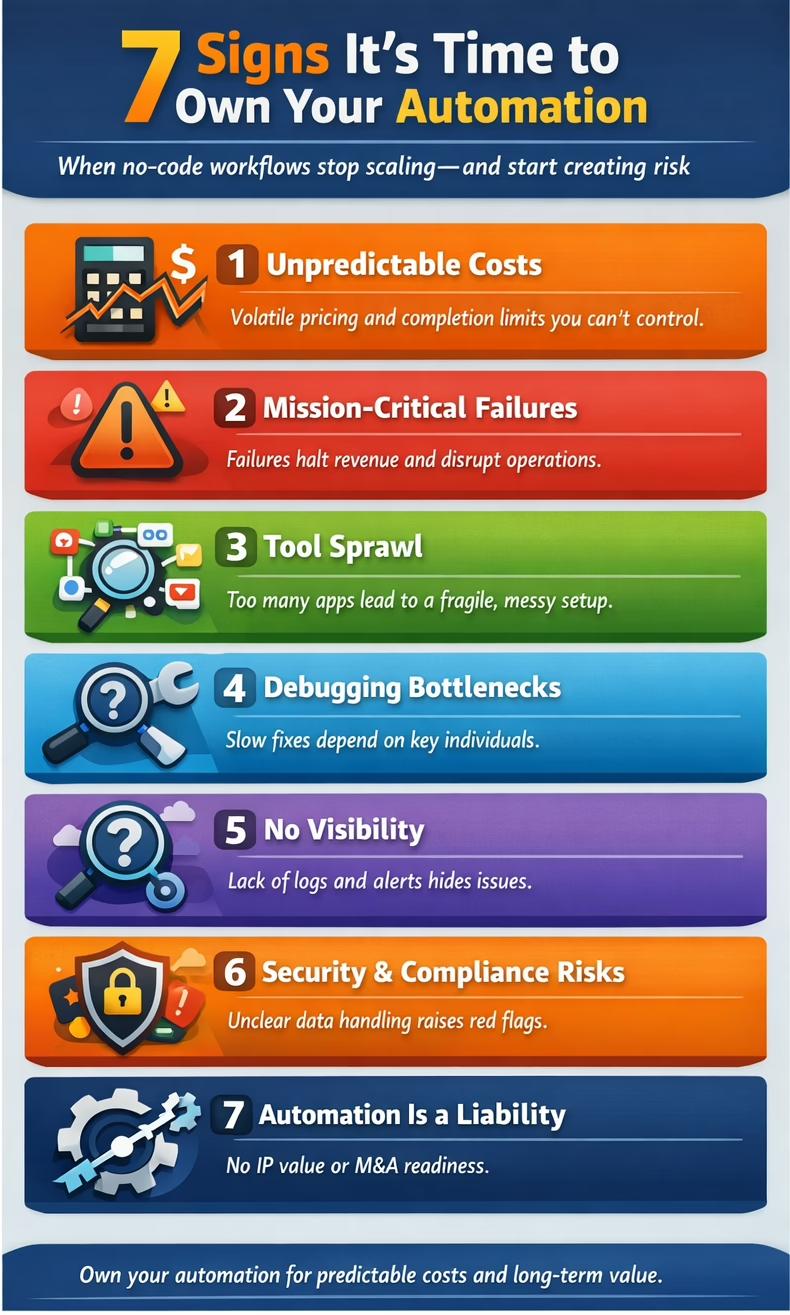
Seven Signs It’s Time to Convert a Workflow to Owned Code
- Volume is high, and costs and completions have become unpredictable.
- The workflow is mission-critical (you lose significant revenue when it isn’t functioning).
- Tool sprawl (e.g., Zapier + Make + Sheets + internal scripts).
- Debugging and updates are difficult—or rely on a single person.
- You need clarity behind the workflows (logs, metrics, better alerts).
- Security and compliance concerns have become major issues (where is this data at all times? what is the cleanup time on temporary data?).
- You care about intellectual property and business value (valuation and M&A readiness). Asset vs. liability.
Start With Confirmation of How Much You’re Spending on Workflows
What to measure:
- Number of automations
- Average number of failures per month
- Average time to repair
- Time spent fixing workflows each month
Although estimating the cost of converting workflows is difficult without specific details, expect an initial upfront expense followed by ongoing hosting fees. If you’re already spending over $100 per month on workflows, plan to save at least 80% annually after the conversion.
The key questions are the cost of developing the new code, how valuable the new code is as an asset versus a dependency, and whether there is capital available for the initial investment.
Migration Playbook
1) Inventory Your Automations
- List workflows, triggers, connected systems, data moved, and owners.
2) Define the System of Record for Each Domain
- Identify the single source of truth for each domain (customers, billing, payroll, projects, etc.).
- Note: multi-master bi-directional workflows are possible but problematic.
3) Convert the Highest-Impact Workflow First
- Pick one that is high-volume, high-friction, and high-risk.
4) Build It as a Small Service With Guardrails
- Validation rules
- Idempotency (duplication, replays)
- Retries
- Rate-limit handling
5) Run in Parallel for a Safe Cutover
- Compare outputs
- Check edge cases
- Switch half of traffic—or all of traffic—when confident
6) Add Observability and Ownership
- Logs, metrics, alerts, and documentation for handoff
The Results
- Predictable cost
- Fewer failures + faster debugging
- Better security posture
- Easier onboarding for new team members
- Automation becomes an asset—not a subscription
Practical Examples
Need help? Contact us for an automation audit.
Share 2–3 workflow examples with us, and we can help you understand the potential ROI from conversion.
- Published in Technology