
Most organizations don’t struggle with a lack of data. They struggle with fragmented systems, unreliable reporting, and dashboards that break the moment something changes.

We built a better approach — combining engineered data pipelines with the flexibility of open-source technology like Metabase. The result is a reliable, scalable dashboard platform delivered as an affordable managed service.

This isn’t a brittle low-code workflow tool. It’s real engineering. Real ETL. Real reliability.
Starting at $250 setup and $35/month during our introductory offer.


Built for Reliability, Not Just Visualization

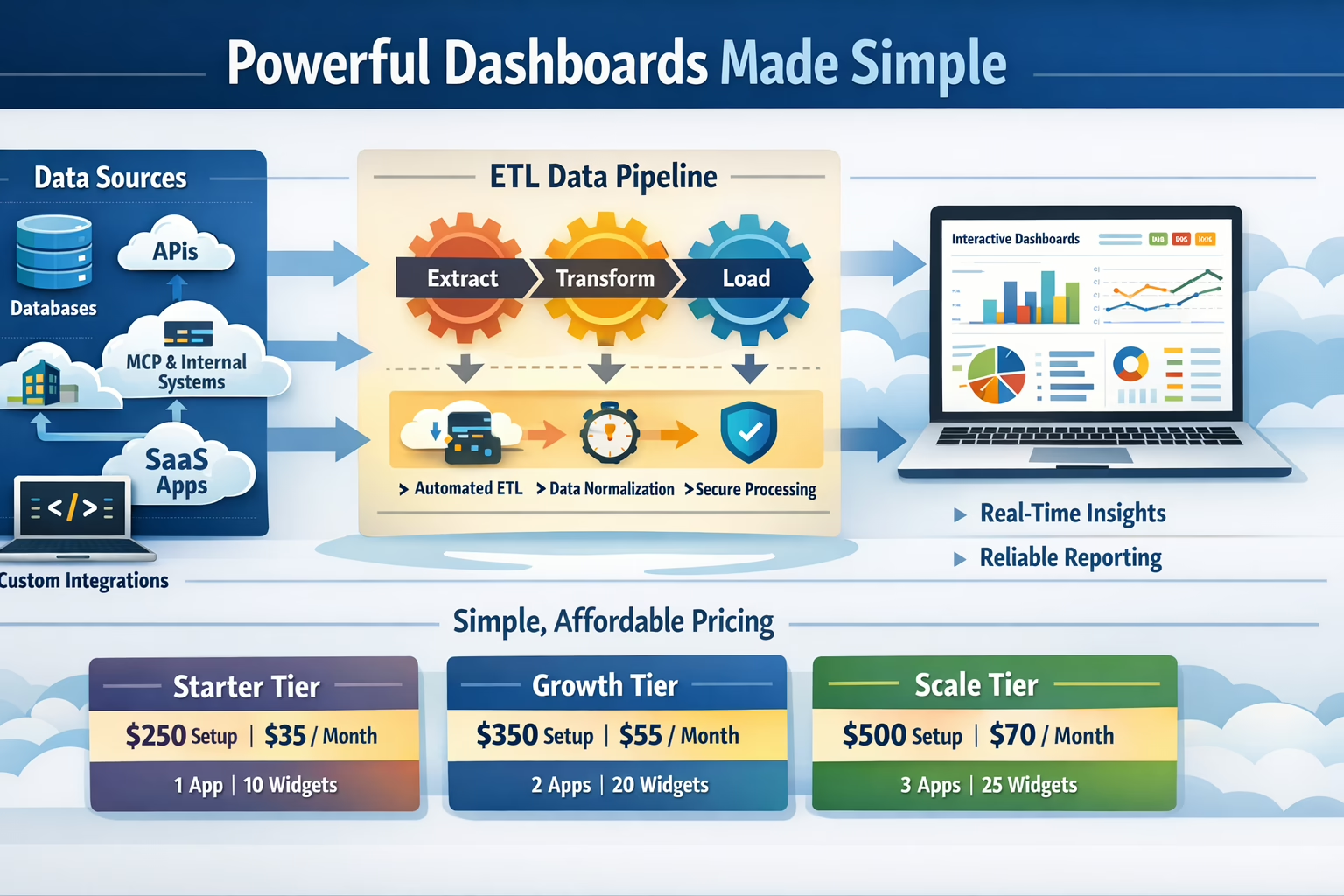
We don’t just connect tools and hope for the best. We’ve built a production-grade scaffold that pulls and normalizes data from multiple systems — ensuring your dashboards stay stable and accurate.

  • Direct database connections (Postgres, MySQL, SQL Server, and more)
  • External API integrations
  • MCP and internal system connections
  • SaaS platform data ingestion
  • Custom backend integrations
  • Engineered ETL pipelines running at defined intervals
  • Isolated dashboard datasets to prevent upstream breakage
  • Secure connection and credential management
  • Scalable architecture designed to grow with your business

The result? Dashboards that remain actionable, accurate, and resilient — even as your systems evolve.


Simple, Transparent Pricing

Our plans are structured to support growing operational complexity — without introducing enterprise-level pricing.

Starter Tier

$250 Setup

$35 / Month


  • 1 Connected Application
  • Up to 10 Dashboard Widgets
  • Managed ETL Pipelines
  • Hosted Dashboard Environment
  • Ongoing Maintenance & Monitoring

Ideal for: Small teams needing visibility into a primary system.

Growth Tier

$350 Setup

$55 / Month


  • 2 Connected Applications
  • Up to 20 Dashboard Widgets
  • Cross-System Data Modeling
  • Scheduled Data Refresh Workflows
  • Managed Support

Ideal for: Teams combining marketing, sales, operations, or finance data.

Scale Tier

$500 Setup

$70 / Month


  • 3 Connected Applications
  • Up to 25 Dashboard Widgets
  • Multi-Source Unified Reporting
  • Enhanced Data Modeling Flexibility
  • Managed Monitoring & Updates

Ideal for: Organizations building executive-level visibility.


Why This Is Different

Many dashboard solutions are either:

  • Cheap but fragile
  • Powerful but enterprise-priced
  • DIY tools that shift engineering burden back to you

We combine open-source flexibility with engineered stability — delivered as a simple subscription.

  • No hiring a data engineer
  • No duct-taping integrations
  • No rebuilding reports every quarter
  • No unpredictable consulting invoices

From Raw Data to Executive Clarity

Dashboards should drive decisions — not create more work.

We help you unify systems, engineer reliable pipelines, and deliver clean, actionable dashboards your team can trust.

Launch in weeks. Operate with confidence. Scale as you grow. Click here to get started.

Over the last decade, enterprises adopted specialized tools to move faster: ticketing here, analytics there,
workflow automation somewhere else. The result? Many organizations now run dozens—sometimes hundreds—of SaaS
products across departments. What started as agility often turns into a web of disconnected systems:
duplicated capabilities, fragile integrations, inconsistent data, and rising costs.

Key takeaway: Platform consolidation isn’t just procurement optimization. It’s an
architecture and operating-model shift toward integrated digital ecosystems that scale.

The Real Cost of Tool Sprawl

Tool sprawl creates hidden taxes across the organization—taxes that don’t show up as a single line item,
but compound over time:

Integration & Maintenance Overhead
  • Custom API connections that break with vendor updates
  • Middleware that becomes a product of its own
  • More systems to secure, monitor, and support

Operational Friction
  • Teams re-entering the same data in multiple places
  • Inconsistent workflows and duplicated effort
  • Slower onboarding and more training burden

Data Fragmentation
  • Multiple “sources of truth” depending on who you ask
  • Inconsistent metrics across finance, ops, and product
  • AI initiatives slowed by siloed and ungoverned data

Cost Growth Without Value Growth
  • Overlapping subscriptions with redundant features
  • Unused seats and underutilized modules
  • Rising spend without measurable outcomes

Why 2026 Is the Tipping Point

The push toward consolidation is happening now because multiple forces are converging:

  1. Budget scrutiny is higher: leadership teams want spend tied to outcomes, not tool counts.
  2. Integration complexity is compounding: every new tool adds new dependencies and risk.
  3. Data has become strategic: fragmented data undermines analytics, automation, and AI.
  4. Security expectations have increased: more tools mean a larger attack surface and more governance overhead.

The problem isn’t that enterprises adopted too many tools. It’s that most didn’t adopt a platform strategy to
make those tools work as a coherent system.

What Platform Consolidation Really Means (And What It Doesn’t)

What it is

  • A strategic architecture shift toward fewer core platforms with strong integration patterns
  • API-first and composable design so capabilities can evolve without rewrites
  • A unified data foundation to improve decision-making and enable AI-ready workflows
  • Standardized operating models for delivery, governance, and change management

What it is not

  • A one-time cost-cutting initiative
  • A forced “rip and replace” program
  • A single-vendor lock-in decision by default
  • An IT-only project without business alignment

The Business Case: Efficiency, Agility, and Scalable Growth

When consolidation is approached as platform strategy—not tool elimination—organizations typically aim for
three outcomes:

1) Operational Efficiency

Reduce integration overhead, standardize workflows, and lower ongoing maintenance so teams can focus on
delivery instead of duct tape.

2) Better Decisions

Build a consistent data model across functions, improving reporting quality and enabling real-time
visibility into performance.

3) Faster Innovation

Create reusable platform capabilities—identity, data access, workflows, APIs—so new products and features
ship faster with less risk.

Architecture Patterns That Make Consolidation Work

Consolidation succeeds when the underlying architecture supports evolution. These patterns show up repeatedly
in high-performing enterprises:

Four patterns to prioritize

API-First Platform Engineering

Treat integration as a first-class product. Define stable APIs, enforce versioning, and build shared
platform services that teams can use consistently.


Event-Driven Integration (Where It Fits)

For real-time operational workflows, event streams can reduce point-to-point coupling and keep systems in
sync without brittle orchestration.


Unified Data Layers

Establish a governed data foundation (e.g., domain-oriented data products or a shared semantic layer) so
analytics, automation, and AI rely on consistent truth.


Cloud-Native Foundations with Governance

Modern infrastructure patterns (observability, identity, policy-as-code) help platforms scale while keeping
risk under control.

Common Pitfalls That Derail Consolidation

Consolidation efforts fail more often from program design than from technology choices. Watch for these traps:

  • Procurement-led consolidation without architecture ownership (tools removed, complexity remains)
  • Underestimating change management (teams work around the platform instead of adopting it)
  • Ignoring data migration and data quality (new system, same broken reporting)
  • No phased roadmap (too big-bang, too risky, too slow)
  • Misaligned incentives (departments optimize locally instead of for enterprise outcomes)
Reality check: Consolidation isn’t a single project. It’s a program that blends
architecture, delivery practices, data governance, and operating-model change.

A Practical Framework for Platform Rationalization

A reliable approach is to treat consolidation as a multi-phase modernization program:

  1. Capability Mapping: Identify the business capabilities each tool supports (not just departments).
  2. Redundancy Assessment: Find overlaps, underused platforms, and critical dependencies.
  3. Data Flow Audit: Map where truth lives, where data breaks, and what needs governance.
  4. Architecture Blueprint: Define the target ecosystem—core platforms, integration patterns, and shared services.
  5. Phased Roadmap: Sequence migrations by business impact and risk, delivering value every quarter.

Where Engineering Teams Create Leverage

Platform consolidation lives at the intersection of strategy and execution. The organizations that move fastest
typically invest in:

Strategy & Architecture

  • Target platform blueprinting and integration strategy
  • Security and governance baked into platform decisions
  • Roadmapping tied to measurable business outcomes

Delivery & Enablement

  • Migration factories and repeatable modernization patterns
  • Platform engineering capabilities (APIs, identity, observability)
  • Operating-model changes that drive adoption (not workarounds)

Conclusion: From Tool Ownership to Platform Advantage

In 2026, platform consolidation is less about reducing the number of tools and more about building an ecosystem
that behaves like a coherent product. The winners will be the organizations that design platforms around business
capabilities, unify data foundations, and standardize integration patterns.

The payoff is practical and compounding: less operational friction, stronger governance,
and faster delivery as the enterprise scales.


Call to Action

If your teams are spending more time stitching tools together than delivering new capabilities, it may be time
to evaluate your platform strategy.

Start a Platform Rationalization Assessment

Replace the button link with your WordPress page or contact form URL.

FAQ: Platform Consolidation

Platform consolidation is the process of reducing tool sprawl by aligning around fewer core platforms,
standardizing integration patterns, and unifying data foundations—so the enterprise operates as a coherent
digital ecosystem.

Not necessarily. Most successful consolidation programs are phased. They prioritize high-impact areas,
reduce redundancy, and modernize integration and data foundations without forcing a risky big-bang change.

Start with capability mapping and a data flow audit. This reveals where redundancy exists, where truth is
fragmented, and which platforms should become the foundation for modernization.

As AI systems move from experimentation into real production workflows, organizations need a secure, governed way to connect models to company systems and data. That’s where MCP servers are quickly becoming essential.

Custom MCP Servers

Summary

  • 1MCP servers provide connectivity and control for how AI systems use and interact with your company data.
  • 2A custom-built MCP server improves security, governance, and reliability by enforcing your policies at the point of AI access.
  • 3Low-code / no-code MCPs are best for prototyping—they can fall short for scalability, security, and mission-critical workloads.
  • 4Serious AI adoption requires treating MCP infrastructure as software, not just something to configure.


What MCP Servers Do (and Why They Matter)

MCP servers provide tools that allow modern AI systems to connect to resources beyond what they’ve been provided in a single model context.
That might be your accounting system, your CRM, or a custom internal platform.

Why “just use existing APIs” often breaks down

  1. APIs often return too much. They’re designed for applications, not for context-limited AI tool use, so they may return bulk data
    instead of only what the AI needs for the current task.
  2. APIs don’t always provide the right control model. Some are all-or-nothing, others are constrained by the connected user,
    and many lack granular guardrails.
  3. APIs can limit visibility. It’s often hard to see exactly what was requested, what was returned, and what the AI did next.

With an MCP server, you can provide exactly what’s needed for the specific interaction—no extra content to confuse the AI,
and no unnecessary functionality that expands your risk surface. You can also track, audit, and adjust tool behavior based on
predefined rules the AI can’t override.

MCP and Security Posture

You’ve likely seen the headlines: “We told AI not to delete the database… but it did it anyway.”
MCP can be the secure entrance into your data and network—but not all MCP servers are created equal.

Common pitfalls with hosted or generic MCP servers

  • Over-broad permissions
  • Hardcoded credentials
  • Lack of auditability
  • Limited isolation between tools or data sources

Custom MCP servers let you apply your security principles to AI interactions—identity, access boundaries,
auditing, and policy enforcement—without relying on generic assumptions.

Low-Code / No-Code MCPs: When They’re Useful and Where They Fall Short

When to use low-code / no-code MCPs

  • Experimentation and internal testing
  • Prototyping workflows
  • Validating a use case before engineering investment

Where they fall short

  • Coarse-grained permissions
  • Limited support for custom authentication flows
  • Limited visibility into parts of the process
  • Weak audit and compliance capability
  • Hard to version, test, and govern

Low-code MCPs optimize for speed and reduced engineering effort—not for control.
That tradeoff is fine during exploration, but it becomes a liability in production.

Production MCP Servers Require Real Code

Why code matters in production

  • Security policies are logic, not just GUI configuration
  • Real error handling and retries that surface actionable failures
  • Domain-specific validation and guardrails (what “safe” means depends on your business)
  • Testability (unit, integration, security testing)
  • CI/CD, version control, and rollback support like the rest of your platform

Don’t cut corners: if MCP is part of your production AI stack, it should meet the same standards as the rest of your software platform.

Choosing the Right MCP Strategy for Your Organization

Use these questions to pressure-test whether you need a custom MCP server:

If the answer to any of the above is yes, building a custom MCP server is typically the better long-term choice.

Looking Ahead: MCP as a Long-Term Control Plane for AI

MCP servers are evolving into a three-part bastion for modern AI:

1) Policy enforcement

Control what AI can access and what actions it can perform—at the boundary where it matters.

2) Governance and visibility

Centralize audit trails, usage patterns, and operational accountability across AI tools.

3) Shared enterprise structure

Create a consistent integration pattern for teams building AI capabilities across the organization.

Organizations that invest early in custom MCP servers can achieve a stronger security posture, faster iteration with AI,
and lower long-term risk.

Building AI responsibly requires more than prompts and plugins.

If you’re moving beyond experimentation and into real-world AI systems, your MCP strategy matters.
Let’s talk about designing an MCP architecture that scales securely—from prototype to production.

Schedule a meeting with a developer

TOP