


The answer increasingly lies in technology—but not in the way most founders fear.
This isn’t about ripping out familiar processes, forcing teams into generic tools, or chasing the latest software trends.
It’s about strategically modernizing the operational backbone so your business runs more efficiently,
more predictably, and with less owner dependency—while preserving the value proposition that made it successful.
Why Technology Matters in a Business Sale
Buyers and investors don’t just evaluate revenue and margins. They look closely at:
- How dependent the business is on the current owner
- How repeatable and documented core processes are
- Whether operations can scale without adding headcount
- How much “busy work” exists behind the scenes
- The quality, reliability, and integration of internal systems
When a business relies heavily on manual work, spreadsheets, tribal knowledge, or the owner’s daily involvement, it introduces risk.
Risk lowers valuation.
Modern, well-designed systems do the opposite: they signal maturity, stability, and future upside.
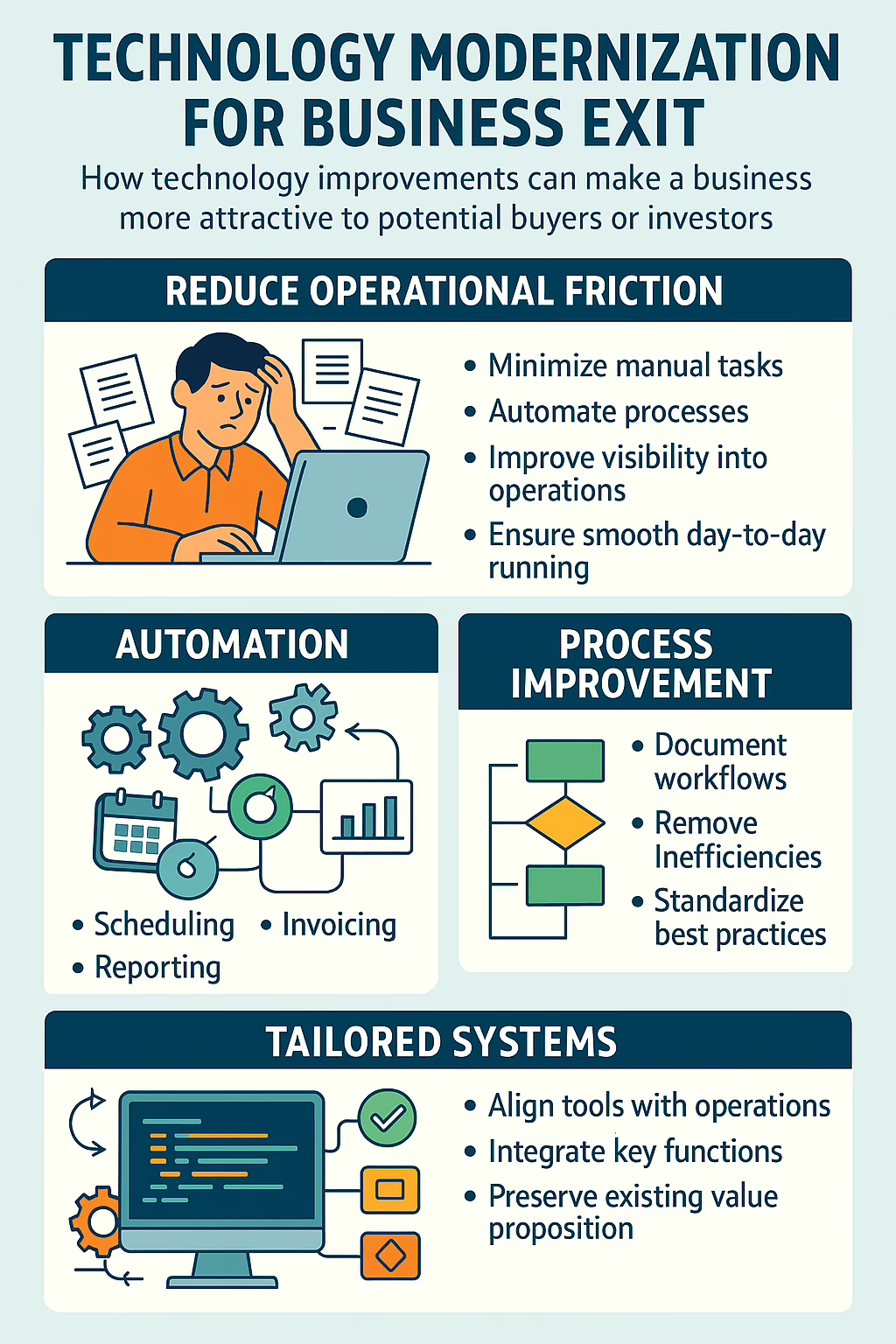
The Real Goal: Reduce Operational Friction, Not Reinvent the Business
One of the biggest mistakes owners make when preparing for an exit is assuming technology means change—for customers, staff, or core workflows.
In reality, the most valuable improvements are often invisible externally.
The goal is to:
- Minimize repetitive, manual tasks
- Automate handoffs between departments
- Improve visibility into operations and performance
- Ensure the business can run smoothly without constant oversight
All without compromising how the product or service is delivered today.
Your customers shouldn’t notice a difference.
Your team should feel relief—not disruption.
And a future owner should see a business that “just works.”
Automations That Buyers Love (and Owners Appreciate)
Strategic automation removes low-value work from daily operations, freeing time and reducing errors. Common high-impact areas include:
- Order or job intake workflows
- Scheduling and resource allocation
- Invoicing, billing, and payment processing
- Reporting and performance tracking
- Customer communications and status updates
The result is a business that feels calmer, more predictable, and less dependent on heroics—something both owners and buyers value highly.
Process Improvement That Preserves Institutional Knowledge
Over time, many businesses evolve processes organically. What started as a simple workaround becomes “the way we do things,”
even if no one can fully explain why.
Before an exit, this creates risk.
Modernizing for sale often includes:
- Mapping critical processes end-to-end
- Removing unnecessary steps and handoffs
- Embedding best practices directly into systems
- Making workflows repeatable and documented
When processes live inside the system—not just in people’s heads—the business becomes far easier to transition.
Using the Right Systems—Not More Systems
Buyers are wary of tool sprawl: disconnected platforms, manual integrations, and systems that only one person understands.
Technology modernization for exit focuses on:
- Choosing systems that align with how the business actually operates
- Integrating tools so data flows automatically
- Eliminating redundant software and shadow processes
- Creating a clear, understandable technology landscape
Simplicity and clarity matter more than feature lists.
A Different Approach: Technology That Fits Your Business
One of the biggest frustrations owners face is being told to “change how you work” to fit a piece of software.
We take the opposite approach.
We build software and systems around the client’s real-world processes.
Not generic workflows. Not off-the-shelf assumptions.
But technology that reflects how value is actually delivered today.
This means:
- Preserving what already differentiates the business
- Supporting existing strengths instead of flattening them
- Making operations easier without losing identity
For buyers, this translates into confidence.
For owners, it means improvement without disruption.
The Exit You’re Really Preparing For
Whether you plan to sell in two years or five, the work you do now has immediate benefits:
- Less day-to-day busy work
- More time out of the weeds
- Better visibility into performance
- A business that runs smoothly without constant involvement
And when the time comes to transition, you’re not selling potential—you’re selling a
well-engineered operation built for continuity and growth.
Thinking about retirement or a future exit?
Modernizing your technology doesn’t have to mean changing your business. When done correctly, it makes what you’ve already built
easier to run, easier to understand, and far more attractive to the next owner.